
You can find micro HDMI to HDMI cables at major electronics retailers like Best Buy, Target, and Walmart, as well as local computer shops and mobile phone accessory stores within your area. Most urban and suburban locations will have at least two or three nearby options, with prices typically ranging from $8 to $25 depending on cable length and build quality.
The search for a micro HDMI adapter or cable locally often stems from an immediate need: connecting a GoPro camera, older tablet, or certain smartphone models to a monitor or TV. While online shopping offers broader selection, local retail provides the advantage of same-day solutions and the ability to physically inspect cable quality before purchase. Understanding what differentiates a quality cable from a budget option can save you from return trips and connection headaches.
Micro HDMI connectors, officially designated as HDMI Type D, measure roughly 6.4mm wide compared to the standard 13.9mm Type A connector found on most TVs and monitors. This smaller form factor made them popular in portable devices from 2010 through the early 2020s, though many newer devices have shifted to USB-C video output. That evolution means you’ll want to verify your specific device uses micro HDMI rather than mini HDMI or another format before heading out to shop.
The key to successful local shopping lies in knowing which retailers stock these cables consistently, what specifications matter for your use case, and how to identify quality construction that will deliver reliable 4K signal transmission without the premium markup some stores apply to “specialty” cables.
Understanding Micro HDMI Cables Before Shopping
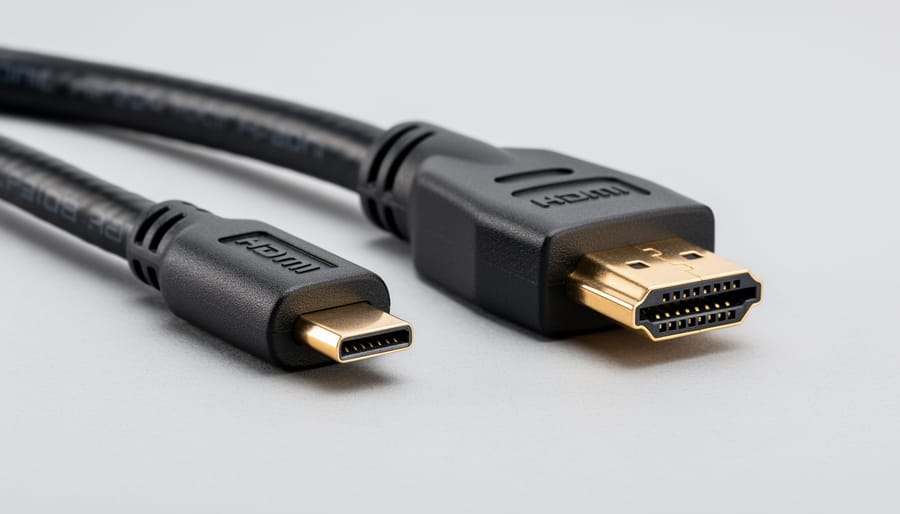
Micro HDMI cables serve as the bridge between compact devices and standard displays, but confusion about connector types can lead to purchasing the wrong cable. The micro HDMI connector, officially designated as Type D in HDMI specifications, measures just 6.4mm x 2.8mm, making it significantly smaller than both mini HDMI (Type C at 10.42mm x 2.42mm) and standard HDMI (Type A at 13.9mm x 4.45mm). This size reduction allows manufacturers to incorporate HDMI connectivity into slim devices like action cameras, smartphones, and ultraportable tablets without compromising port space.
The physical differences between these connector types matter when shopping locally because stores often stock them inconsistently, and grabbing the wrong type means a wasted trip. Standard HDMI connectors dominate home entertainment equipment, while mini HDMI appears primarily on older DSLR cameras and some camcorders. Micro HDMI has become the preferred choice for modern portable devices where every millimeter counts, including GoPro action cameras, Raspberry Pi boards, and select Android tablets.
Despite their size differences, all three connector types can transmit the same HDMI signal capabilities when paired with appropriate cables. A quality micro HDMI to HDMI cable supports resolutions up to 4K at 60Hz with HDMI 2.0 specification, and some newer cables handle 4K at 120Hz or 8K at 60Hz with HDMI 2.1. Your actual resolution and refresh rate depend on both your source device and the cable’s HDMI version, which retailers don’t always label clearly on packaging.
Common devices requiring micro HDMI connections include GoPro Hero cameras (models 3 through 8), select Lenovo and Asus tablets, Nikon D500 and D7500 DSLR cameras, and Raspberry Pi 4 single-board computers. Before heading to a local store, check your device’s port carefully under good lighting or consult your manual, as mistaking micro HDMI for mini HDMI is surprisingly common. Following basic compatibility tips prevents buying cables that physically won’t fit your equipment, regardless of how good the in-store deal appears.
Local Retailers That Stock Micro HDMI to HDMI Cables
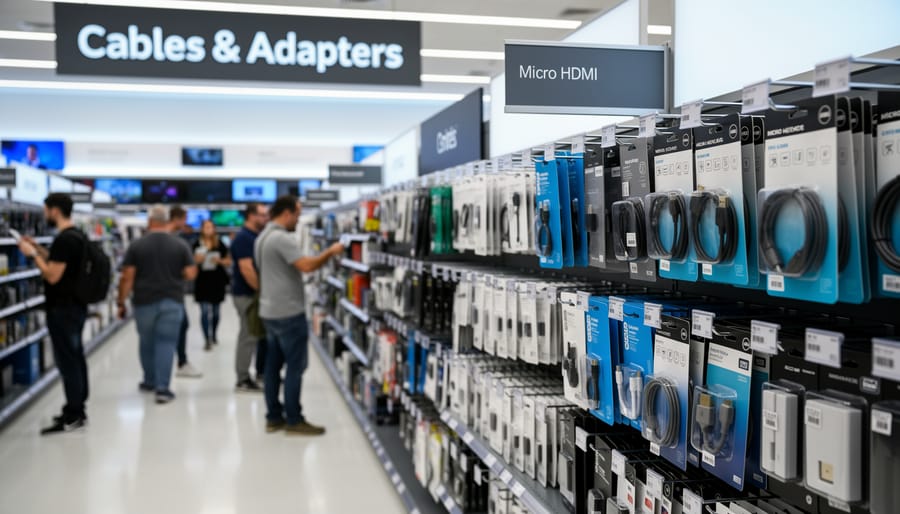
Electronics specialty stores remain the most reliable destination for micro HDMI to HDMI cables, with chains like Best Buy and Micro Center maintaining dedicated sections for cable connectivity. These retailers typically stock multiple cable lengths and quality tiers, though prices run higher than online alternatives. You can expect staff with at least basic technical knowledge who can confirm compatibility for your specific device.
Computer hardware retailers such as Fry’s Electronics locations (where still operating) and regional computer parts stores carry micro HDMI cables primarily for their PC building and peripheral customer base. These shops often stock cables near their graphics card and monitor sections, as micro HDMI occasionally appears on compact GPUs and portable monitors. Inventory tends toward basic functional cables rather than premium options, but prices generally fall below big-box electronics store levels.
Big-box stores like Walmart and Target maintain limited micro HDMI cable selections in their electronics departments, typically positioned near phone accessories or general computing cables. Stock varies significantly by location, with urban stores more likely to carry these specialized adapters than rural outlets. Expect one or two options at most, usually in the budget-to-midrange pricing bracket, and minimal staff expertise on technical specifications.
| Retailer Type | Stock Availability | Typical Price Range | Selection Variety |
|---|---|---|---|
| Electronics Specialty Stores | High (90%+) | $15-$40 | Multiple brands, lengths |
| Computer Hardware Retailers | Moderate to High (70-85%) | $12-$30 | Functional options, limited premium |
| Big-Box Electronics Departments | Low to Moderate (40-60%) | $10-$25 | 1-2 options, basic models |
| Camera and Photography Shops | Moderate (60-75%) | $15-$35 | Quality-focused, limited quantity |
Camera and photography shops like local camera stores and chains such as B&H Photo (in-store locations) stock micro HDMI cables specifically for DSLR and mirrorless camera users who need to connect their devices to monitors or TVs. These retailers prioritize cable quality over price competitiveness, as photographers often require reliable connections for professional work. Staff here understand device compatibility well but may not know broader technical specifications beyond camera-specific applications.
Mobile device accessory stores, including standalone phone repair shops and kiosks in shopping centers, occasionally carry micro HDMI cables for tablet and smartphone users. Inventory remains unpredictable at these locations, as micro HDMI has become less common in modern mobile devices. When available, these cables typically cost between $8 and $20, positioning them as budget-friendly emergency purchases rather than long-term solutions.
Office supply chains like Staples and Office Depot maintain small cable selections that sometimes include micro HDMI adapters, filed alongside their general electronics accessories. Stock probability sits around 30-50 percent depending on store size and location demographics. These retailers serve customers who need immediate solutions during business hours, though their limited technical inventory means calling ahead saves wasted trips.
What to Look for When Buying in Person
When you walk into a store to buy a micro HDMI cable, bring your device or at least know its exact model. Retail packaging often lists compatible devices, but verifying compatibility on the spot prevents returns later.
Start with cable length. Measure the distance between your device and display before shopping. Most stores stock 3-foot, 6-foot, and 10-foot options. Shorter cables reduce signal degradation and cost less, but buy slightly longer than your measurement to avoid tension on the connectors. A cable pulled taut will fail faster than one with slack.
Examine the connectors closely. Quality micro HDMI connectors have smooth gold plating without visible scratches or uneven coating. The micro HDMI end should fit snugly in your device’s port without excessive wiggling. Loose connections cause intermittent signal loss. Check that the standard HDMI connector is Type A and matches your display input.
Feel the cable itself. Thicker cables generally indicate better shielding, which blocks electromagnetic interference from nearby devices. Braided or reinforced jackets near the connectors resist the repeated bending that kills cables prematurely. Avoid cables that feel flimsy or have thin plastic housing around the connectors.
Look for the HDMI version printed on the packaging. HDMI 2.0 cables support 4K at 60Hz, while HDMI 1.4 handles 4K at 30Hz. If you’re shooting 4K video on a camera or connecting a high-resolution tablet, verify the cable supports your required specifications. Similar to considerations in our Y HDMI cable guide version compatibility affects performance directly.
Ask about the return policy before purchasing. Many retailers allow returns within 14 to 30 days with a receipt. This matters because cable performance issues sometimes appear only after use. Keep packaging and receipts until you’ve tested the cable with your actual setup.
Common mistakes to avoid: Don’t assume all micro HDMI cables work identically. Budget cables may lack proper shielding or use lower-quality connectors. Don’t buy the longest cable available thinking it provides flexibility. Excessive length introduces signal loss, especially at 4K resolutions. Don’t trust vague packaging claims like “high speed” without checking the actual HDMI version number.
Test the cable in-store if the retailer allows it. Some electronics stores have display setups where you can verify signal quality before buying. If testing isn’t possible, inspect the return policy carefully and plan to test within that window.
Cable Specifications That Matter for Your Device
When you pick up a micro HDMI cable at a local store, the version number printed on the packaging directly affects what your device can display. An HDMI 1.4 cable handles 1080p at 60Hz and 4K at 30Hz, which works fine for older tablets and basic action cameras. HDMI 2.0 pushes bandwidth to 18 Gbps, supporting 4K at 60Hz with HDR, essential for newer 4K cameras and gaming laptops. HDMI 2.1 cables offer 48 Gbps bandwidth for 8K video and 4K at 120Hz, though few micro HDMI devices currently need this capacity.
Understanding these specification terms helps you choose the right HDMI cable for your setup:
- Bandwidth
- The data transfer capacity measured in gigabits per second (Gbps), determining the maximum resolution and refresh rate the cable can handle. Higher bandwidth supports more demanding video formats.
- HDMI Version
- The specification standard (1.4, 2.0, 2.1) that defines the cable’s capabilities. Later versions support higher resolutions, faster refresh rates, and newer features like variable refresh rate.
- Resolution Support
- The maximum image quality the cable can transmit, from 1080p Full HD through 4K (3840×2160) to 8K (7680×4320). Your device’s output and display must both support the same resolution.
- HDR Compatibility
- High Dynamic Range capability that delivers enhanced contrast and color depth. Requires HDMI 2.0 or higher and compatible devices on both ends of the connection.
Match the cable to your specific device type. Digital cameras outputting 4K video need HDMI 2.0 at minimum. Tablets streaming 1080p content work perfectly with HDMI 1.4. Gaming laptops with high-refresh displays benefit from HDMI 2.1 if they support 4K above 60Hz. Action cameras typically output 1080p or 4K at standard frame rates, making HDMI 2.0 the practical choice.
Cable length affects signal quality, particularly at 4K and above. Passive micro HDMI cables reliably carry 4K signals up to 10 feet. Beyond that distance, signal degradation can cause dropouts or reduced resolution. Check your cable’s rated length against your setup distance.
Shielding quality matters more than version numbers for many users. A well-shielded HDMI 2.0 cable outperforms a poorly-made HDMI 2.1 cable in real-world conditions. Look for triple-layer shielding mentioned on packaging, which protects against electromagnetic interference from nearby electronics and prevents screen flickering or signal loss during use.
Common Questions About Local Micro HDMI Cable Shopping
Do most electronics stores actually stock micro HDMI cables?
Availability varies significantly by store size and specialization. Large electronics chains and camera shops typically carry them, while smaller retailers often stock only standard HDMI cables. Calling ahead saves wasted trips.
Are local store prices much higher than online?
Expect to pay 20-40% more at physical retailers due to overhead costs, though sale prices can occasionally match online rates. The premium buys you immediate availability and the ability to inspect before purchasing.
Where can I find a micro HDMI cable urgently today?
Best Buy and camera specialty shops have the highest likelihood of same-day stock. Office supply stores sometimes carry them in their computer accessory sections, though selection is limited.
Should I buy in person or order online?
Buy locally when you need the cable immediately or want to verify build quality firsthand. Order online for better selection, lower prices, and access to detailed specifications and HDMI cable reviews that help you make informed decisions.
The choice between local and online shopping depends on your timeline and technical requirements. If you’re connecting a camera for an event tomorrow, paying extra at a local retailer makes sense. For non-urgent needs, online shopping gives you time to research specifications, compare options, and verify compatibility with your specific device. Just as you’d carefully pick the right splitter for audio needs, taking time to select the correct micro HDMI cable prevents compatibility issues and returns.
Local inventory fluctuates, especially for specialty items like micro HDMI cables. Stores restock based on demand patterns, meaning availability improves around product launch cycles and holiday seasons. If your first choice store is out of stock, check camera shops next since they serve photographers who frequently need these cables for mirrorless cameras and action cameras. Many retailers can check inventory at nearby locations, potentially saving you multiple store visits.
Finding a micro HDMI to HDMI cable locally doesn’t require extensive searching, electronics retailers, computer stores, big-box chains, camera shops, and mobile accessory outlets typically stock these adapters. The key is approaching your purchase with the right information. Before you hand over your money, verify the cable supports your device’s resolution requirements, check the HDMI version matches your bandwidth needs, and examine the build quality to ensure durability. A few minutes spent confirming connector compatibility and cable specifications will save you from frustration and return trips.
Your specific device determines what you need. Whether you’re connecting a mirrorless camera, action cam, or tablet, matching the cable’s capabilities to your hardware prevents performance bottlenecks. While local shopping offers immediate availability, don’t compromise on the technical requirements your setup demands. For detailed comparisons between cable types and in-depth technical specifications, Direct Cables provides comprehensive guides to help you make informed decisions about all your connectivity needs.